ZhuQue BooksDesktop bookkeeping
What it does
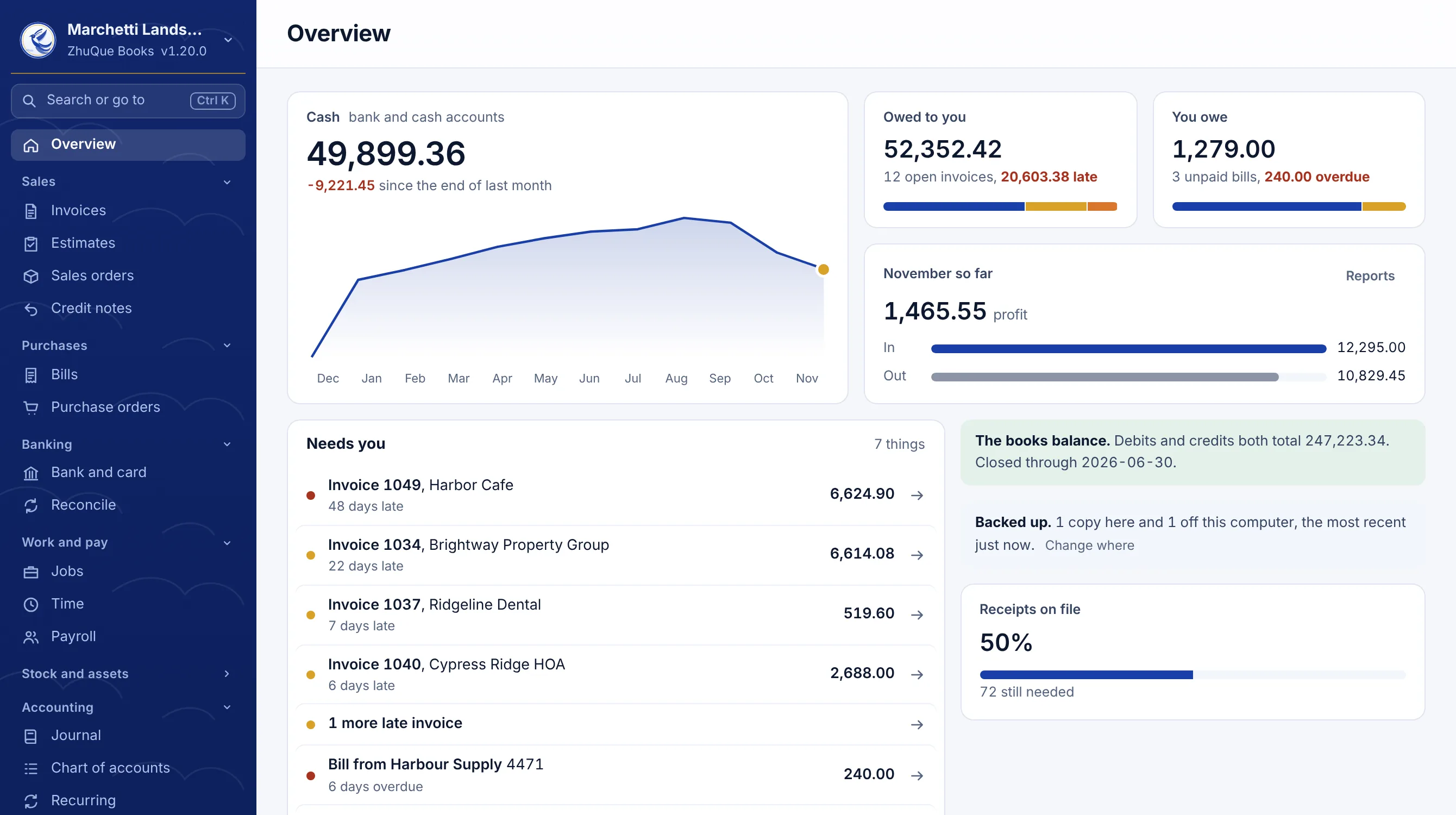
Real double-entry. Debits equal credits or the entry is refused, in the code and in the database. Nothing is edited or deleted once it is posted; a mistake is corrected by a reversing entry, the way a ledger is supposed to work.
Day to day
- Invoices, estimates and credit notes, each written to a PDF in your own folder as you save it
- Bills, vendors and payments, with a duplicate-invoice guard the database itself enforces
- Purchase orders, raised, received against, and matched to the supplier’s bill
- Progress billing: a job invoiced in stages against one quote, with what you have already billed carried forward
- Jobs and job costing across estimates, invoices, bills, journal lines and labour
- Sales orders: what was promised, what went out, and a back-order list of what the shelf cannot fill
- Classes, so a second shop, a fund or a department reads as its own column on the P&L
Time, and billing it
- Timesheets by day, job and class, with a stopwatch, rounded to the minute and not to the nearest six
- Unbilled hours turned into a draft invoice, grouped the way you want it to read
- The same hours feeding the pay run, counted once, with the overtime worked out from the week they fell in
- Utilisation: hours logged, hours billable, and the margin on an hour where there is one to know
Money in and out
- Bank and card import from CSV, Excel and OFX, with a review queue and a re-import that does not duplicate
- Receipts photographed on your phone, sealed before they upload, waiting in the same queue
- Reconciliation with a solver that names transposed digits, unticked items and sign errors
- Sales tax return, reconciled against the Sales Tax Payable account rather than just totalled
Stock and assets
- Stock with cost of sales posted as it sells, and a stock figure that ties back to the ledger
- Weighted average or FIFO, set per item, with the layers worked out from the movements so they cannot drift
- Lot and serial numbers, and a trace from a batch to the customers who have it
- Several locations, with transfers that move goods and post nothing
- Assemblies: parts off the shelf, product on, valued at the sum of its parts
- Bought by the case, counted by the each
- Fixed assets and depreciation
- Budgets against actual
Reports, and your accountant
- Trial balance, profit and loss on either basis, balance sheet, cash flow, customer statements
- Workpapers as real .xlsx with live formulas, not a flat export
- Read-only share links: expiring, revocable, passcode-able, encrypted before upload
- An accountant’s copy with a dividing date: they adjust last year while you invoice this one, and the two cannot overlap
- A class report that proves it adds back to the plain profit and loss rather than asking you to assume it
Payroll figures
- Gross pay with FLSA overtime at the regular rate
- Loaded labour cost onto jobs
- 1099 totals by vendor
Coming over, and staying safe
- Imports from QuickBooks Desktop: the chart, customers, vendors and your balances at a cutover date you pick
- Invoices and quotes emailed from your own address, so replies come back to you and we never hold your mail password
- A Pay this invoice button in that email, paid on a page Stripe hosts, into your own Stripe account at your own rate. We are not in the middle of it and take no cut
- Receipts stored by content hash, so the same photo is never filed twice
- Encrypted backups: kept locally, in a folder you sync yourself, and in our cloud
- Several people in the same books: one machine hosts, the others connect, named users with roles
- An API on your own machine with keys you issue and revoke, a log of every call, and webhooks that queue rather than vanish
The backups are sealed before they leave your computer
Your books are encrypted on your machine with a passphrase we never receive. What our server holds is a numbered blob it cannot read, with nothing in its name to say whose books it is. If somebody copied the whole bucket tomorrow they would have a pile of noise.
The cost of that is real and worth saying plainly: lose the passphrase and those backups are gone, by construction. That is why the program makes you confirm you have written it down somewhere that is not that computer.